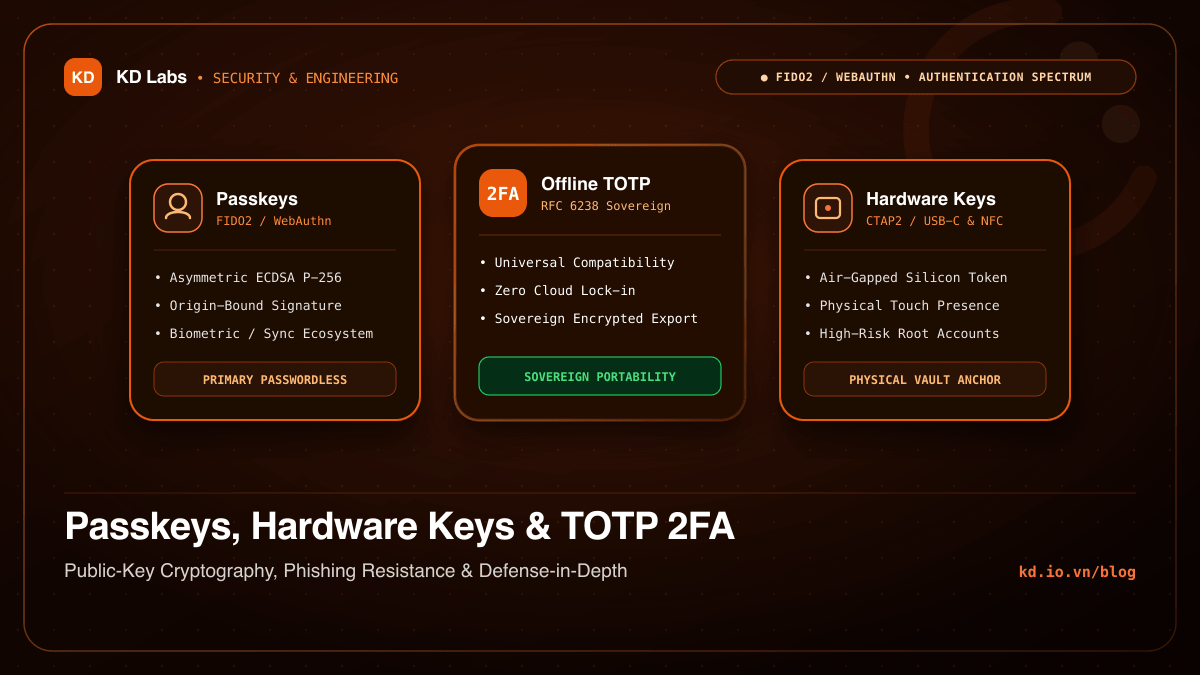
Over the past few years, the FIDO Alliance alongside Apple, Google, and Microsoft has championed Passkeys as the successor to traditional passwords. Headlines frequently proclaim that “Passkeys will soon make passwords and two-factor authentication (2FA) obsolete.”
From a practical security engineering perspective, however, no single authentication primitive is a silver bullet for every threat model. In this analysis, KD Labs dissects the public-key cryptography behind Passkeys (FIDO2/WebAuthn), evaluates their real-world trade-offs against Physical Hardware Keys (YubiKey) and Offline TOTP 2FA (RFC 6238), and shows you how to architect a resilient, vendor-neutral personal security stack.
1. Shifting from Shared Secrets to Asymmetric Public-Key Cryptography
Both traditional passwords and TOTP codes rely on a Shared Secret model: both the client and the verifying server possess the same underlying secret material. While TOTP eliminates static password reuse, a user can still be tricked by a real-time Adversary-in-the-Middle (AiTM) phishing proxy into typing a 6-digit code onto a counterfeit domain.
The FIDO2 standard (comprising the W3C WebAuthn browser API and the CTAP2 device protocol) replaces shared secrets with Asymmetric Public-Key Cryptography:
[ User Authenticator Device ]                        [ Relying Party Server (RP) ]
   Holds Private Key (K_priv)                           Stores Only Public Key (K_pub)
             │                                                     │
             │ ◄────── 1. Send Cryptographic Challenge ─────────── │
             │            (Challenge + RP_ID: github.com)          │
             │                                                     │
   2. Verify Browser Origin                                        │
      & Biometric Unlock                                           │
      Sign: Sig = Sign(K_priv, Challenge || RP_ID)                 │
             │                                                     │
             │ ────── 3. Return Digital Signature (Sig) ─────────► │
             │                                                     │
                                                       4. Verify with K_pub:
                                                          Verify(K_pub, Sig) == OK
Why FIDO2 / Passkeys Are Mathematically Phishing-Resistant
When you register a Passkey on github.com, your authenticator generates a unique elliptic-curve keypair (ECDSA P-256 or Ed25519) cryptographically scoped to that exact Relying Party ID (rpId = "github.com").
Suppose you click a deceptive link leading to a lookalike phishing domain such as githuh-login.com:
- The browser inspects the TLS origin in the address bar (
githuh-login.com) and passes that exact string to the WebAuthn subsystem. - Because no keypair is registered for
githuh-login.com, the authenticator refuses to sign the challenge. - Even if a user actively wants to hand over their credential to the phishing page, there is no human-readable secret to type or copy.
2. Code Reference: Origin-Bound WebAuthn Assertion in the Browser
To see how the browser enforces origin binding (rpId) and hardware biometric verification (userVerification), examine a standard W3C WebAuthn assertion call:
/**
 * Requests a cryptographic FIDO2 / WebAuthn signature bound to the current origin
 */
export async function authenticateWithPasskey(
  serverChallenge: Uint8Array,
  rpId: string = 'kd.io.vn'
): Promise<PublicKeyCredential | null> {
  const assertionOptions: PublicKeyCredentialRequestOptions = {
    // High-entropy random nonce (minimum 16 bytes) generated per login attempt
    challenge: serverChallenge,
    // Strictly bound to the authentic domain; defeats reverse-proxy phishing
    rpId: rpId,
    timeout: 60_000,
    // Mandate local biometric or device PIN verification inside the enclave
    userVerification: 'required',
    allowCredentials: [], // Empty array allows Discoverable Credentials (Passkeys)
  };

  const credential = await navigator.credentials.get({
    publicKey: assertionOptions,
  });

  return credential as PublicKeyCredential | null;
}
3. The Hidden Trade-Offs of Synced Passkeys: Convenience vs. Sovereignty
If FIDO2 is so resilient against phishing, why do experienced security engineers still rely on Offline TOTP 2FA and Hardware Security Keys? The answer lies in how consumer Synced Passkeys are architected:
3.1. Centralized Cloud Concentration Risk
In original FIDO U2F hardware keys, private keys were strictly non-exportable from the physical silicon token. To prevent everyday consumers from losing access when they drop their phone, Apple, Google, and Microsoft introduced Multi-Device Credentials (Synced Passkeys)—synchronizing your FIDO private keys across iCloud Keychain or Google Password Manager.
While convenient, this introduces two structural trade-offs:
- Single Ecosystem Blast Radius: Every synced Passkey in your life now depends on the security and availability of a single cloud identity (your Apple ID or Google Account). If your cloud account is suspended, locked, or compromised on a trusted device, your entire credential vault is impacted.
- Cross-Platform Friction & Ecosystem Lock-in: Authenticating across disparate ecosystems (e.g., logging into a service on a Linux workstation using a Passkey stored on a mobile OS) requires Bluetooth proximity handshakes and cloud relay servers (Hybrid Transport / caBLE), whereas an offline 6-digit TOTP token works across any air-gapped screen in seconds.
3.2. Universal Protocol Coverage
Millions of critical production systems—including Linux SSH (PAM), enterprise VPN gateways (WireGuard / OpenVPN), banking portals, financial exchanges, and self-hosted infrastructure—standardize on RFC 6238 TOTP because it requires zero browser-specific APIs or proprietary cloud relays.
4. Head-to-Head Comparison: Passkeys vs. Hardware Keys vs. Offline TOTP
| Evaluation Criteria | Synced Passkeys (iCloud / Google) | Physical Hardware Keys (YubiKey) | Sovereign Offline TOTP (Simple OTP) |
|---|---|---|---|
| Cryptographic Primitive | Asymmetric ECDSA / Ed25519 | Asymmetric Hardware Token | Symmetric HMAC-SHA (RFC 6238) |
| Origin Phishing Immunity | ✅ Enforced by browser rpId |
✅ Enforced by browser rpId |
⚠️ Requires user URL verification |
| Service Compatibility | ⚠️ Growing (Major web platforms) | ⚠️ Moderate–High (Web & SSH) | ✅ Universal (~99% of 2FA services) |
| Ecosystem Independence | ❌ Tied to Apple / Google / MS clouds | ✅ Vendor-neutral (USB-C / NFC) | ✅ 100% Sovereign & OS-agnostic |
| Portable Offline Backups | ⚠️ Locked inside cloud keychain | ❌ Non-exportable (Requires spare key) | ✅ Encrypted .simpleotp AES-256 export |
| Cost to Deploy | Free (Bundled with OS) | High ($50–$110 for primary + backup) | Free & Open Source (MIT) |
5. Defense-in-Depth: Designing a Tiered Personal Authentication Stack
Rather than treating Passkeys and TOTP as mutually exclusive, mature security practitioners deploy a Tiered Authentication Architecture:
- Tier 0 – Root Cloud & Identity Accounts (Primary Email, Apple ID, Password Manager): Protect with a high-entropy Master Passphrase paired with Physical Hardware Security Keys or an offline TOTP authenticator running on an isolated device. Never store the 2FA recovery factor for your cloud account inside that same cloud account (avoiding circular lockout).
- Tier 1 – Developer Infrastructure & Financial Assets (GitHub, AWS, Cloudflare, Exchanges): Use FIDO2 Passkeys or hardware keys for primary interactive logins, and always enroll an offline TOTP secret inside Simple OTP as a sovereign, cloud-independent second factor.
- Tier 2 – Everyday Web Services, VPNs, SSH & Self-Hosted Tools: Pair unique random passwords with RFC 6238 TOTP. Because an offline authenticator operates without network sockets or Bluetooth relays, you can authenticate reliably across any workstation, terminal, or operating system.
“True digital resilience means ensuring no single technology giant holds the sole master key to your entire digital identity.”
Conclusion
Passkeys (FIDO2/WebAuthn) represent a major leap forward against credential stuffing and lookalike domain phishing. At the same time, Offline TOTP (RFC 6238) remains the universal, vendor-neutral bedrock of two-factor authentication.
By combining FIDO2 where supported with a 100% offline, hardware-backed authenticator like Simple OTP, you achieve both modern convenience and uncompromising personal sovereignty.